 SunnyHome
Cloud solar monitoring and control
Solar monitoring with battery and appliance tracking. In one place.
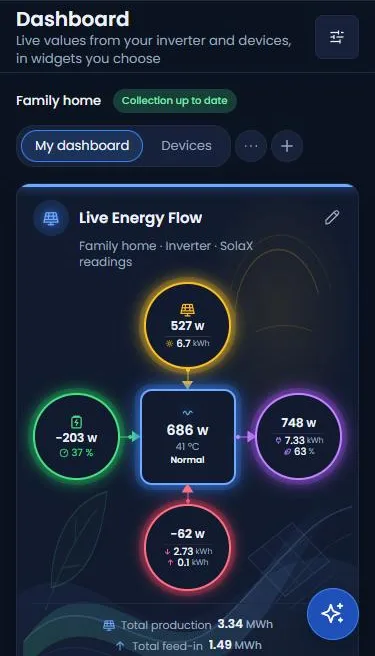
SunnyHome shows what your solar plant, battery and home are doing right now, what you save and what each appliance costs. Build your dashboard from widgets and let rules run the water heater or another appliance on solar surplus. Nothing to install.
- First month free, everything included
- No card needed
- Cancel any time
Works with your inverter and smart home
 SolaXdirectly through its cloud
 Deyeits cloud or Home Assistant
 GoodWethrough Home Assistant
 Growattthrough Home Assistant
 Solisthrough Home Assistant
 Sofarthrough Home Assistant
 Home Assistantdevices and sensors
 Shellyplugs and relays
 Tuyaplugs and relays
- 30+dashboard widgets
- 10dashboards of your own
- 20appliance looks
- ~1 mindata refresh through Home Assistant
What SunnyHome does
From a live view of your solar plant to a home that runs itself.
Dashboard and widgets
Over 30 widgets in 8 widths and 8 heights, with your own colours and looks. Up to 10 dashboards for your computer and phone.
More about widgets Basic and FullAppliance tracking
A washing machine, dishwasher or dryer on a smart plug: when it ran, how much it used and what it cost. A notice when it finishes.
More about appliances FullAutomations and solar surplus
Heat water from solar surplus and switch devices by price, time and battery level. Try a rule in test mode first.
More about automations FullBattery and spot prices
A battery charging plan from spot prices and the solar forecast, for supported inverters. Hourly electricity prices are in Basic too.
More about prices and the battery FullElectric car charging
Your wallbox next to your solar plant: charged kWh in the statistics and, for supported wallboxes, charging on solar surplus and switching modes.
More about car charging FullAI assistant
Ask in plain words about production, prices and appliances. It answers from your own data and can prepare an automation.
More about the assistantA dashboard you build yourself
Every home is different. Pick the widgets you care about, set their size, colour and look and move them where you want. Keep one dashboard for the overview and another for the technical detail.
- Energy flow, charts, gauges, prices, forecast, weather
- 8 widths and 8 heights; small widgets switch to a compact form
- Save a layout to a file and carry it elsewhere
See what each appliance costs
Put a washing machine, dishwasher or dryer on a smart plug and SunnyHome recognises every run by itself. It shows the energy and the cost by your tariff, tells you when the run is done and advises when it pays to switch on.
- Today’s runs and a monthly overview by appliance
- The load that never switches off, and what it costs a month
- “Start it now?” advice from the solar forecast
See what your solar plant really saves
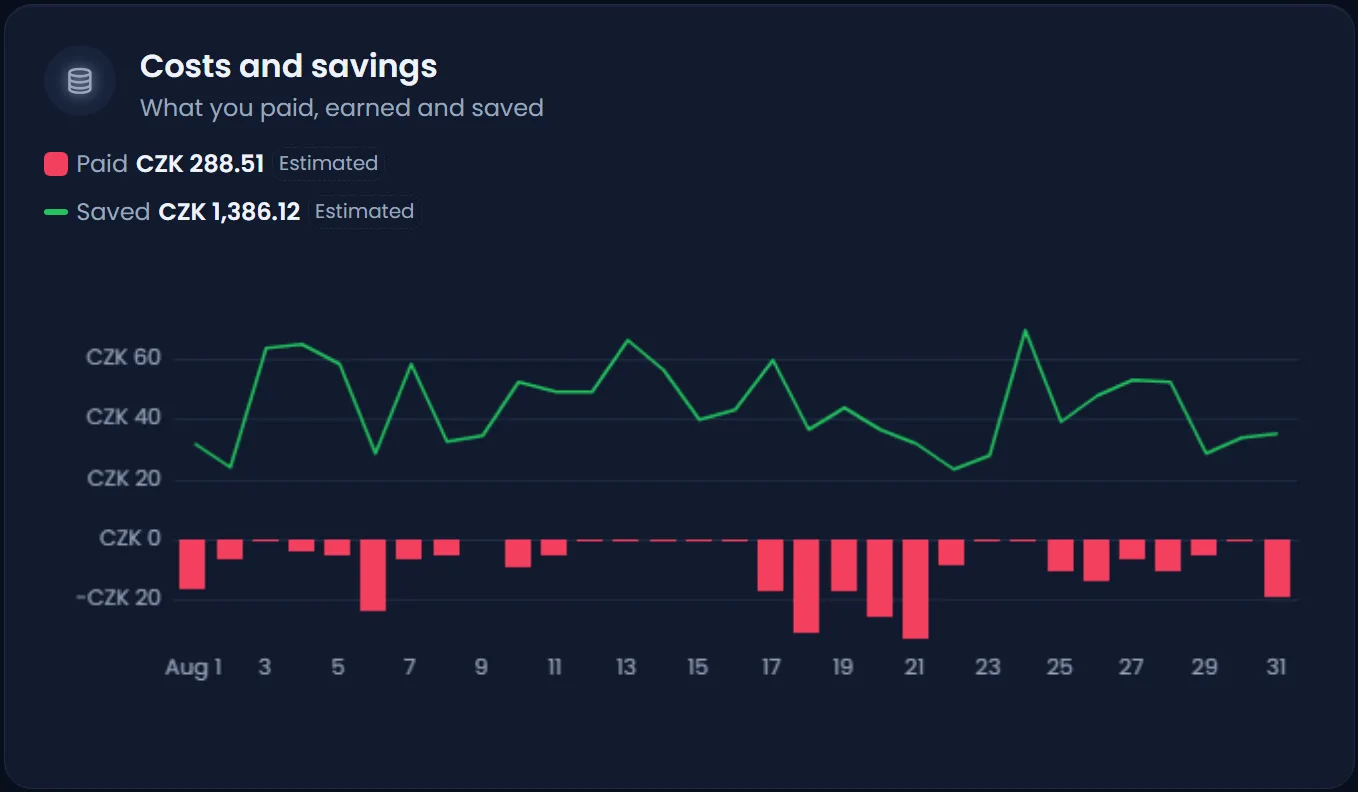
Daily statistics in money, spot prices next to your tariff, a weather-based solar forecast and the payback of your investment.
- Savings and export earnings for every day
- Solar forecast for today and tomorrow
- History and charts, CSV export
Up and running in minutes
Sign in with Google
No new password, no card.
Connect your inverter
Pick the manufacturer – SolaX, Deye, GoodWe, Growatt and more – and sign in to its cloud or to Home Assistant.
Try everything for a month
Then pick a plan. Your history stays saved either way.
Simple pricing
Paid monthly for each site, every further site for less. The first month is free with everything.
Basic
See everything your plant does
CZK 69 for the first site and month
+ CZK 29 for each further site
- Live data, history and statisticsLive energy flow, charts of every day, daily statistics with your savings, solar forecast, weather and electricity prices, CSV export.
- Recommended
Full
Let the sun run your home
CZK 129 for the first site and month
+ CZK 59 for each further site
Everything in Basic, plus:
- Device controlSwitch your Home Assistant, Shelly and Tuya devices from SunnyHome, wherever you are.
- AutomationsRules that run your devices on solar surplus, in the cheapest hours or on a schedule, with frost and legionella protection.
- AI assistantAsk about your plant, prices, the forecast, devices and automations in plain words; it answers from your own data.
- Custom email notificationsYour own emails when your rules hold, with live values from your plant in the text.
- First month free, everything included
- No card needed
- Cancel any time
Questions
Do I need to install anything?
No. SunnyHome runs in the cloud. Connect your inverter maker's cloud or your Home Assistant and data starts flowing.
Does it work with my inverter?
SolaX and Deye connect directly through their cloud. GoodWe, Growatt, Solis, Sofar and others through Home Assistant.
Can I arrange the dashboard my way?
Yes. Pick from more than 30 widgets, set their size, colours and look, and keep up to 10 dashboards.
How does SunnyHome track appliances?
Through a smart plug with power metering (Shelly, Tuya or a plug from Home Assistant). From the power curve it tells where a run starts and ends and works out its energy and cost.
Can it heat water from solar surplus?
Yes. A rule switches the water heater on when there is solar surplus, and a separate rule takes care of legionella protection. Automations are part of the Full plan.
Does it work with spot prices?
Yes. It shows hourly prices, and with the Full plan it can plan battery charging and switch devices by them.
Do I need Home Assistant?
No. SolaX and Deye work without it. With Home Assistant you can connect more brands and data arrives about every minute.
What happens after the free month?
You pick Basic or Full. If you don't, collection stops but your history stays saved.
Who sees my data?
Only you. Data is stored in the EU.
Ready to see your energy clearly?
The first month is free, with everything SunnyHome does.