
Dashboard and widgets · Basic and Full
A dashboard of widgets: your solar plant the way you want to see it
Pick from more than 30 widgets, set their size and look and build a dashboard that shows exactly what you want to see. On a computer and on a phone.
- First month free, everything included
- No card needed
- Cancel any time
Over 30 widgets for your solar plant and home
Add a widget with one click and change or remove it any time. Some are offered once there is data for them, such as a wallbox, appliances on smart plugs or your tariff.
Live energy
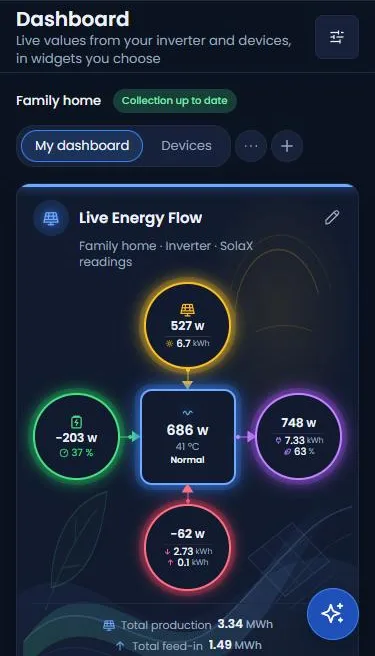
What is happening right now between the panels, battery, home and grid.
- Energy flowA live picture of where energy flows between the panels, battery, home and grid.
- Daily power chartSolar, home, grid and battery power through the day.
- Today chartUp to 6 readings of your choice in one chart, as lines or areas.
- ValueOne reading as a number or as a gauge: an arc, a needle, a ring or a bar.
- SparklineA small chart of one reading over the last 24 hours or today.
- Energy summaryOne figure of the day: production, consumption, self-sufficiency, grid import or export.
- Source cardThe battery, panels, inverter, home or grid with the readings you pick.
- InvertersYour inverters and batteries with their state and main readings.
- StatusThe state of data collection or of one device.
- RecordsYour plant's records, such as its best day and highest power.
- AlarmsAlarms the inverter reports, in one place.
Money, prices and forecast
What you save and when electricity is cheap.
- Electricity pricesElectricity prices hour by hour, for buying and for selling.
- Today’s costs and savingsWhat today cost and what it saved, by your tariff.
- PaybackHow much of the investment your solar plant has paid back.
- Low tariffThe low-tariff hours at your site and whether one is on now.
- PV forecastExpected solar production from the weather forecast.
- PV forecast historyHow the forecast matched real production on past days.
- WeatherThe weather at your plant.
Battery and charging
The battery's plan, endurance and health, and the wallbox.
- Battery planFullWhen the battery will charge and discharge, by prices and the forecast. For supported inverters.
- Battery lastsHow long the home would run on the battery alone.
- Battery healthThe battery's health and capacity, for batteries that report them.
- WallboxA connected wallbox: its state, charging power and charged energy.
Appliances and devices
Plugs, relays, thermometers and appliances from Home Assistant, Shelly and Tuya, plus notifications and news.
- DeviceOne device from Home Assistant, Shelly or Tuya in the look you pick, from a plug to a thermostat.
- AppliancesEvery appliance on a metered plug and what it is doing now.
- Today's runsWhich appliance ran when today, next to solar production.
- Appliances this monthThis month's consumption by appliance.
- Always onThe load that never switches off, and what it costs.
- Start it now?Advice on when it pays to start an appliance, from the surplus and the price.
- Who is homeWho is home, from the people in Home Assistant.
- NotificationsThe latest notifications of your account.
- Shared with meReadings from another plant, once its owner shares them with your account.
- NewsNews about SunnyHome.
Widget sizes, looks and several dashboards
Sizes made to measure
A dashboard has 8 columns. Give each widget a width and a height from 1 to 8 and its content adapts: a small widget shows the essentials, a large one adds detail.
- 8 widths and 8 heights
- Move widgets by dragging
- Section headings and empty spaces to keep things tidy
A look that suits you
The same reading can be a number, an arc, a needle, a ring or a thermometer. Give a plug the look of the appliance that hangs on it.
- Arc gauge
- Needle gauge
- Ring gauge
- Bar gauge
- Battery
- Band
- Live power
- Thermometer
- Meter
- Water tank
- Thermostat
- Washer
- Dishwasher
- Dryer
- Fridge
- Lamp
- Fan
- Heater
- + 13 more
Up to 10 dashboards
One for a quick look, another for the battery and the technical detail, a third for appliances. Save a layout to a file and load it at another site.
- Your own dashboard names
- Layout export and import
- On a phone the widgets line up one under another
Questions about widgets
How many widgets can a dashboard have?
Hundreds, far more than fit on a screen. And you can keep up to 10 dashboards.
Can I show devices from Home Assistant?
Yes. Add switches, lights, sensors, thermostats and water heaters from Home Assistant as a Device widget.
Are widgets part of the Basic plan?
Dashboards and every widget that shows data are in both plans, appliance tracking included. Switching a device from a widget, the battery plan and charging control belong to the Full plan.
Related features
Appliance tracking
A washing machine, dishwasher or dryer on a smart plug: when it ran, how much it used and what it cost. A notice when it finishes.
More about appliances FullAutomations and solar surplus
Heat water from solar surplus and switch devices by price, time and battery level. Try a rule in test mode first.
More about automations FullBattery and spot prices
A battery charging plan from spot prices and the solar forecast, for supported inverters. Hourly electricity prices are in Basic too.
More about prices and the batteryBuild your own dashboard
The first month is free, with everything SunnyHome does.